 Profound Custom quote
 Peec AI $95/mo
 Otterly.AI EUR 29/mo
 Scrunch $250/mo
 AthenaHQ $295/mo
 Semrush AI Toolkit $99/mo
 Ahrefs Brand Radar $50/mo
 SE Ranking $129/mo
 Rankscale EUR 99/mo
 Promptwatch $95/mo
 Goodie $295/mo
 Evertune $60/mo
AI Visibility
How to measure traffic from ChatGPT and Perplexity in GA4
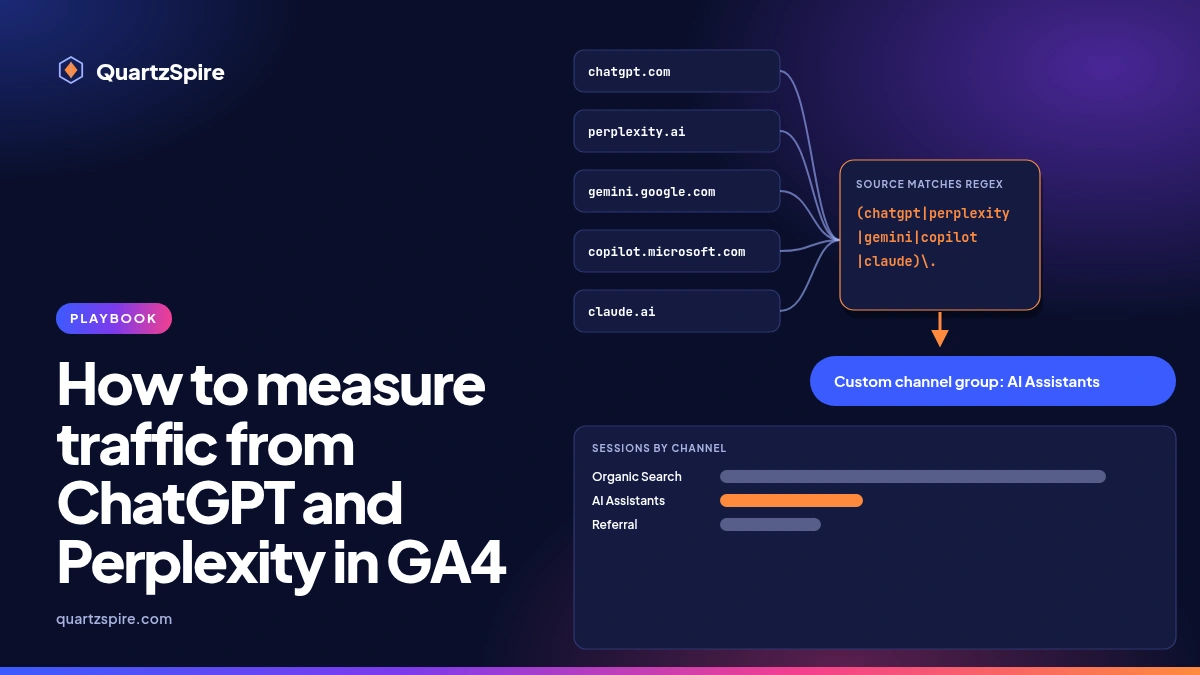
Use a GA4 custom channel group and an Exploration to see referral sessions from chatgpt.com and perplexity.ai.
On this page 9 sections
- What GA4 can and cannot see
- Look at the raw sources before you write a regex
- Build a custom channel group
- Anchored regex for an AI assistants channel
- An Exploration that answers the useful question
- How not to read the number
- A weekly check that takes a few minutes
- Five-minute weekly GA4 check
- Regex mistakes that count the wrong traffic
- Four regex mistakes and their fixes
- What you might pay for, and what you should not
- FAQ
You measure traffic from ChatGPT and Perplexity in GA4 by treating it as referral traffic: a browser loaded your page and the referrer host was one of those products. You group those hosts with a regex, you put the group where Referral will not swallow it, and you read it in an Exploration next to landing pages. You do not get a complete count of people who saw your name in an answer.
That limit is the first result, not a footnote. What is AI visibility? counts mentions and citations inside answers. This page counts clicks that carried a referrer. A citation with no click never appears here. A click with no referrer appears as direct, or not as assistant traffic. Both reports can be true on the same day.
What GA4 can and cannot see
GA4 records a hit when the tag runs in a browser. Session source for a normal referral is the referring host. If a person taps a link in ChatGPT and the browser sends a referrer of chatgpt.com or chat.openai.com, you can group it. If the product opens an in-app webview that strips the referrer, the session is not labeled as ChatGPT. If they copy the URL into a new tab, the session is direct. You cannot reconstruct those from the tag.
Crawlers are a different problem. GPTBot and similar agents do not arrive as GA4 sessions. robots.txt for AI crawlers is how you reason about fetches. Do not look for GPTBot in GA4 and conclude it stopped.
Consent changes the hit. This site’s tag sets Google Consent Mode so analytics storage is denied by default for visitors in the EEA, the UK, and Switzerland, and ad storage is denied everywhere. There is no banner that later grants storage. Where analytics storage is denied, you should not read the AI channel as a full cookie-based session count for those regions. The privacy page states the defaults. Do not add a popup to “fix” the report. The report is incomplete on purpose in those places, because the consent default is denied.
Look at the raw sources before you write a regex
Open GA4, go to Explore, and start a free-form exploration. Add the dimension Session source and the metric Sessions. Rows: Session source. Sort by sessions. Search the list for openai, chatgpt, perplexity, claude, gemini, and copilot. Write down the exact strings you see. GA4 sometimes stores the host without www and sometimes with a subdomain. Your regex should match the strings you found, plus the hosts you expect to see next.
A starter pattern, in RE2 style as GA4 uses it, is:
^(chatgpt\.com|chat\.openai\.com|perplexity\.ai|www\.perplexity\.ai|claude\.ai|gemini\.google\.com|copilot\.microsoft\.com)$If your property shows sources such as chatgpt.com only, you do not need the www alternative, but it does no harm if the match is anchored. Do not use a bare openai or google substring. google would swallow ordinary Google traffic. openai\.com without an anchor would be broader than chat.openai.com. Anchors matter.
Perplexity, Claude, Gemini, and Copilot are in the same pattern so one channel can mean “assistant referral” while a breakdown by Session source still shows which product. If you only care about ChatGPT, delete the other alternatives. Do not add domains you have not seen and cannot name. A regex is a claim about referrers.
Build a custom channel group
Anchored regex for an AI assistants channel
Channel name: AI assistants. Condition: Session source matches regex:
^(chatgpt\.com|chat\.openai\.com|perplexity\.ai|www\.perplexity\.ai|copilot\.microsoft\.com|gemini\.google\.com|claude\.ai)$Place this channel above Referral in the group order. Without the ^ and $ anchors, a look-alike host that only contains that string would also match.
The default channel group already has Referral. Assistant hosts will sit there unless you define a channel and place it higher in the list, because the first matching channel wins.
In GA4: Admin, then Data display, then Channel groups. Create a group or copy the default so you do not edit the default in place. Add a channel named AI referrals. Set the condition to Source matches regex, and paste the pattern. Drag that channel above Referral. Save.
This group is a dimension you choose. It does not rewrite Session default channel group for the past. When you share a chart, say “custom channel group AI referrals,” not “default channel.” People will otherwise compare it with a standard report that still says Referral.
If the condition builder offers Session source rather than a generic Source, use Session source. Campaign source is for tagged links. These products are not tagging links for you. Do not wait for utm_source=chatgpt. You will not get it from a product you do not operate.
Do not add these hosts to the referral exclusion list. Exclusion is for domains that should not start a session, such as a payment step. Excluding perplexity.ai hides the traffic.
An Exploration that answers the useful question
The useful question is: which landing pages receive sessions whose source matches those hosts.
- Explore, then Blank or Free form.
- Name it AI referral landings.
- Add dimensions: Session source, Landing page + query string.
- Add metrics: Sessions, Engaged sessions.
- Rows: Landing page + query string. Columns or a breakdown: Session source.
- Add a filter: Session source matches regex, with the same pattern.
- Set the date range. Do not compare it with a range from before the tag existed.
If the filter returns nothing, go back to the unfiltered Session source list. Either the strings differ from the regex, or you had no such referrers in the range. Both are ordinary. Do not loosen the regex to . to “see if it works.” You will count the property.
Engaged sessions are a check against one-hit bounces, not a quality score for the answer engine. A high session count on a page that is not the page you hoped would be cited is a content clue: people who click are landing somewhere else. Pair that with the citation log. How to track brand mentions has the cited URL. This Exploration has the landing URL. When they differ, the answer pointed at one page and the click, if any, arrived on another, or the click came from a different answer than the one you logged.
How not to read the number
Do not multiply sessions by a guessed factor to “add back” missing referrers. You do not know the factor. Report the sessions you can see and the sentence about what is missing. Do not call the channel “AI visibility.” Visibility is mentions and citations. This is clicks with a referrer. AI visibility metrics should not use GA4 sessions as citation rate. The denominators are unrelated.
Do not merge this channel with organic search in one total and then talk about SEO. GEO vs AEO vs SEO keeps those outcomes in different columns. A custom channel is another column. It can be small and still be real.
Do not panic when chatgpt.com and chat.openai.com both appear. They are two hosts that have both been used as referrers as the product’s URLs changed. Keep both in the regex if both appear. Splitting them in the breakdown is fine. Adding them is fine if you label the sum “OpenAI chat referrers,” not “all ChatGPT users.”
Consent and ad blockers remove more hits. This site denies analytics cookies in the EEA, UK, and Switzerland. A chart that ignores that will be read as a demand problem. It may be a measurement boundary. Say which property and which consent defaults the chart used.
A weekly check that takes a few minutes
Five-minute weekly GA4 check
- Open the saved Exploration: AI assistants channel x Landing page x Sessions
- Compare this week with the previous 4 weeks, not with yesterday
- Scan Session source for new AI hosts that still fall into Referral
- Add any new host to the regex with a dated note
- Log the top 5 landing pages next to your citation log, in separate columns
Once the exploration is saved, open it on the same weekday as the prompt log. Note sessions by source and the top landing pages. If a landing page is a surprise, open it. You may find an old URL that still earns clicks while your new URL is the one you log as the citation target. That is a canonical or a content problem, not a GA4 problem. Schema markup for AI search will not move the referrer. The link the answer showed will.
If the exploration is empty for a month, leave it empty in the report. An empty AI channel with a healthy prompt log means people are seeing answers and not arriving with a referrer, or they are not clicking. You cannot tell those apart from GA4 alone. The prompt log tells you whether you were named. Only a click with a referrer tells you they arrived.
Regex mistakes that count the wrong traffic
Four regex mistakes and their fixes
| Mistake | What goes wrong | Fix |
|---|---|---|
chatgpt with no anchors |
Matches any host containing the string | Anchor with ^ and $ and escape dots |
Unescaped dot in perplexity.ai |
. matches any character |
Write perplexity\.ai |
| Condition on Page referrer | Counts mid-session referrers inconsistently | Use Session source for channel rules |
| AI channel below Referral | Referral claims the sessions first | Move the AI channel above Referral |
A pattern without anchors is the usual bug. chatgpt matches a source only if GA4’s matcher finds that substring. Depending on the operator you picked, an unanchored pattern can also match a campaign name or a page path if you applied it to the wrong field. Use Session source, and anchor the pattern with ^ and $ so chatgpt.com.evil.example does not match and notchatgpt.com does not match. The starter regex in this guide is anchored for that reason.
Escaping dots matters. In a regex, a dot matches any character. perplexity.ai without a backslash matches perplexityXai. Write perplexity\.ai. GA4 will not warn you. You will notice only if a nonsense source appears, or you will not notice at all.
Test the pattern on the strings you copied from the source report, including the ones you want to exclude. google.com must not match. gemini.google.com should match if you included it. news.google.com must not. The starter pattern uses the full gemini host, not google\.com, for that reason. bing.com must not match just because Copilot is a Microsoft product. copilot.microsoft.com is the host to list if that is the referrer you see. microsoft.com alone is far too wide.
Case is usually insensitive in GA4 regex, but do not rely on a mixed-case host you typed once. Copy the source value. If both ChatGPT.com and chatgpt.com appear, confirm the matcher treats them as one before you add two channels.
After you save the channel group, run the exploration on a short date range you already inspected by hand. The session total for the filter should equal the sum of those source rows you circled. If it is larger, the regex is wide. If it is smaller, a source string differs from the pattern. Adjust once. Do not stack a second channel that overlaps the first. Overlap makes the first matching channel steal the session and the second chart look empty.
Write the final pattern into the same note as the exploration’s name. When someone duplicates the exploration next quarter, they will otherwise “simplify” the regex and reintroduce google. The note is ten lines. It is the whole measurement design. AI visibility metrics has the same habit: the formula sits next to the chart. The regex is the formula for this report.
What you might pay for, and what you should not
You do not need a new analytics product to do the steps above. GA4 is already on the page. A vendor that offers “AI traffic” should show you the same referrer strings or a method you can audit. If the method is a panel or a model, ask for the definition. Do not drop it into the same cell as Sessions.
Best AI visibility tools and ChatGPT brand monitoring measure answers, not GA4 sessions. Buy them for the log of prompts, not because GA4 feels low. Free AI visibility tools is the same distinction at a lower price, and the price still has to be read on the vendor’s site. The software ROI calculator compares a yearly fee with hours. The hours to maintain this exploration are small. The hours a tool saves are small too, unless it is doing the prompt log you do not want to paste. Do not pay the prompt-log price for a referrer regex.
When the question is which of your pages an answer cited before anyone clicked, look at citation tracking tools that log the URL behind the click, then match those URLs to GA4 landing pages.
llms.txt will not show up as a source. How to get mentioned in Perplexity changes whether an answer names you. This page only notices some of the clicks afterward. Keep the tickets separate so a quiet GA4 chart is not used to kill a citation program, and a busy citation log is not used to claim revenue you cannot see in the property.
Save the exploration in a shared property, not only in a personal workspace, so the regex does not live in one login. Name a backup viewer. If the exploration breaks after a GA4 interface change, the note with the pattern is enough to rebuild it in a few minutes. Rebuild from the note rather than from memory. Memory drops the anchors. The anchors are the part that keeps ordinary Google traffic out of the AI channel. Losing them is how a chart suddenly looks like a success. Check the source breakdown whenever the total jumps. A jump that is all google.com is a regex bug. A jump that is chatgpt.com is a traffic change. You can tell only if the breakdown is still on the exploration. Leave it on.
To turn a count into a rate, run it through the percentage calculator.
FAQ
Why is ChatGPT traffic lower than we expected?
Because many sessions never send a referrer. In-app browsers, privacy settings, and copies of a URL into a new tab show up as direct or not at all. The report is a lower bound, not a census. Do not invent a multiplier.
Should we exclude these domains from referrals?
No. Referral exclusion is how you hide payment gateways and self-referrals. Excluding chatgpt.com would drop the visits you are trying to see.
Does this include crawlers such as GPTBot?
No. Crawlers do not run the GA4 tag as a browsing session. Bot fetches belong in server logs. The robots guide covers those user agents.
Will a custom channel group change last year's default channel?
No. The default channel group is not rewritten by a custom group. Use the custom group as a dimension in Explorations and in reports that let you pick it. Say so when you share a chart.
Which hosts should the regex include?
Start with the hosts you can see in your own Session source report, and include chatgpt.com, chat.openai.com, perplexity.ai, claude.ai, gemini.google.com, and copilot.microsoft.com if they appear or you expect them. Check the raw values before you lock the pattern.
See a factual problem? Write to hello@quartzspire.com with this page URL.